Datetime
a). xaxis.labels.datetimeFormatter
This is the default settings for x-axis labels generation in a time series.
xaxis: { labels: { datetimeFormatter: { year: 'yyyy', month: 'MMM \'yy', day: 'dd MMM', hour: 'HH:mm' } } }
Based on the difference between minX (leftmost datetime) and maxX (rightmost datetime), xaxis labels are generated.
If the difference is > 5 years - the labels are generated in yyyy format.
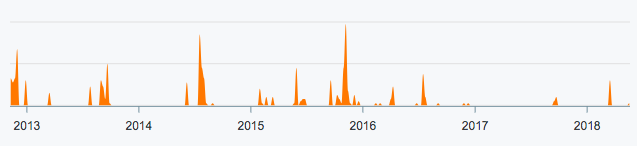
If the difference is > 2 years and < 5 years - the labels are a mix of yyyy and MMM 'yy
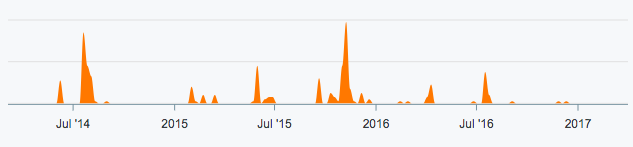
and so on till it gets to the hours.
b). xaxis.labels.format
The X values formatting for datetime values can also be formatted by:
xaxis.labels.format = 'dd/MM'
This will fix the labels formatter and will not consider whether the difference in time is in years/months/days/hours
xaxis: {
  labels: {
    format: 'dd/MM',
  }
}
c). xaxis.labels.formatter
Overrides everything and applies a custom function for the xaxis value.
xaxis: {
  labels: {
    formatter: function (value, timestamp) {
      return new Date(timestamp) // The formatter function overrides format property
    },
  }
}
Passing timestamp values
Always pass timestamps as milliseconds (Unix ms). Use Date.getTime() or Date.now() to produce the correct value:
series: [{
  name: 'Sessions',
  data: [
    [new Date('2024-01-01').getTime(), 120],
    [new Date('2024-02-01').getTime(), 145],
    [new Date('2024-03-01').getTime(), 98]
  ]
}],
xaxis: { type: 'datetime' }
A Date object works too, and since 6.10 it keeps its millisecond resolution and is accepted by the type definitions. Before 6.10 the milliseconds were truncated, so points inside the same second collapsed onto each other.
series: [{
  name: 'Sessions',
  data: [
    { x: new Date('2024-01-01T09:30:00.250Z'), y: 120 },
    { x: new Date('2024-01-01T09:30:00.780Z'), y: 145 },
  ]
}],
xaxis: { type: 'datetime' }
Timezone handling
ApexCharts renders datetime labels using the browser's local timezone. If your timestamps are in UTC and your users are in different timezones, the displayed dates will shift. There is no built-in timezone conversion: convert your timestamps to local time before passing them, or force UTC display in the label formatter:
xaxis: {
  type: 'datetime',
  labels: {
    formatter: function(value) {
      // Force UTC display regardless of browser timezone
      const d = new Date(value)
      return d.toLocaleDateString('en-US', { timeZone: 'UTC', month: 'short', day: 'numeric' })
    }
  }
}
Troubleshooting: labels show wrong dates
If labels appear one day behind, the most common cause is timezone offset. A timestamp for 2024-01-15 00:00:00 UTC displays as Jan 14 in UTC-5 because midnight UTC is still the previous day locally. Fix by using noon UTC as the representative timestamp for day-granularity data:
// Instead of midnight UTC:
new Date('2024-01-15').getTime()      // 2024-01-15T00:00:00Z (shifts in negative offset zones)

// Use noon UTC:
new Date('2024-01-15T12:00:00Z').getTime()  // stays Jan 15 in any timezone ±12h
The table shows the valid options available for format specifiers.
| Format Specifier | Description |
|---|---|
| “dddd” | The full name of the day of the week. |
| “ddd” | The abbreviated name of the day of the week. |
| “dd” | The day of the month, from 01 through 31. |
| “d” | The day of the month, from 1 through 31. |
| “MMMM” | The full name of the month. |
| “MMM” | The abbreviated name of the month. |
| “MM” | The month, from 01 through 12. |
| “M” | The month, from 1 through 12. |
| “yyyy” | The year as a four-digit number. |
| “yy” | The year, from 00 to 99. |
| “y” | The year, from 0 to 99. |
| “hh” | The hour, using a 12-hour clock from 01 to 12. |
| “h” | The hour, using a 12-hour clock from 1 to 12. |
| “HH” | The hour, using a 24-hour clock from 00 to 23. |
| “H” | The hour, using a 24-hour clock from 0 to 23. |
| “mm” | The minute, from 00 through 59. |
| “m” | The minute, from 0 through 59. |
| “ss” | The second, from 00 through 59. |
| “s” | The second, from 0 through 59. |
| “fff” | The value of milliseconds in three digits. |
| “ff” | The value of hundredth and tenth millisecond. |
| “f” | The value of hundredth millisecond. |
| “tt” | The am/pm designator. (lower case) |
| “t” | The first character of the am/pm designator. (lower case) |
| “TT” | The AM/PM designator. (upper case) |
| “T” | The first character of the AM/PM designator. (upper case) |