chart.zoom
Configuration Structure
chart: {}The zoom options let users zoom into axis charts by dragging a selection, scrolling the mouse wheel, or using the toolbar buttons. You can restrict zooming to a single axis, auto-scale the y-axis to the visible range, and style the highlighted zoomed area. It is part of the chart configuration.
zoom
enabled
To allow zooming in axis charts.
Note: In a category x-axis chart, to enable zooming, you will also need to set xaxis.tickPlacement: 'on'.
Read more on the Category Axis Zoom tutorial.
The keyboard zoom and pan keys (+, -, 0 and Shift with an arrow, listed under Accessibility) follow the same rule: they never zoom or pan a chart that cannot zoom.
type
Allow zooming either on both x-axis, y-axis or on both axis. Available options
- x
- y
- xy
Known Issue: In synchronized charts, xy or y will not update charts in sync, while x will work correctly.
autoScaleYaxis
When this option is turned on, the chart's y-axis re-scales to a new low and high based on the visible area. Helpful in situations where the user zoomed in to a small area to get a better view.
Known Issue: This option doesn't work in a multi-axis chart (when you have more than 1 y-axis)
allowMouseWheelZoom
Zoom the x-axis with the mouse wheel or a trackpad, anchored on the cursor. Requires zoom.enabled: true.
| Value | Behaviour |
|---|---|
'auto' (default) | Cooperative: a bare wheel scrolls the page past the chart, and Ctrl + wheel (⌘ + wheel on a Mac) or a trackpad pinch zooms. Offered only while the toolbar shows its reset button, so every zoom can be undone. |
true | Zoom on every wheel, without a key, even with the toolbar hidden. This was the 'auto' behaviour before 8.3. |
false | No wheel zoom. |
From 8.3 a page of zoomable charts scrolls normally. To keep the old wheel, where scrolling over the chart zooms it, set true:
chart: {
  zoom: {
    enabled: true,
    allowMouseWheelZoom: true
  }
}
wheelHint
With the cooperative 'auto' wheel, a bare vertical scroll over the chart briefly shows how to zoom it: "Use Ctrl + scroll to zoom", or ⌘ on a Mac. Set false to hide the hint. Added in 8.3.
The text is the locale's toolbar.wheelZoomHint, where {key} is replaced by Ctrl or ⌘. See locales.options.toolbar.wheelZoomHint to translate it.
pinch
Momentum: enable two-finger pinch-zoom on touch devices. It zooms the x-axis around the pinch centroid, frame by frame, and requires zoom.enabled: true. 'auto' (the default) offers it only while the toolbar shows its reset button, the same gate as the wheel; true forces it on with the toolbar hidden, and false turns it off. See the Mobile gestures guide.
resetControl
The way back out of a zoom on a chart whose toolbar is hidden. Added in 7.4.
Drag-to-zoom is a deliberate gesture, so unlike the wheel and the pinch it is not withheld when the toolbar is hidden. The reset button that undoes it is. That leaves a viewer who drags across a bare chart inside a window with nothing on screen that puts the range back.
So while the chart is zoomed and nothing else on screen can reset it, one reset control is drawn where the toolbar would have been, and it goes when the range does. Escape resets under the same gate. A chart nobody zooms is untouched: toolbar: { show: false } still means an empty chart for every viewer who does not zoom.
| Value | Behaviour |
|---|---|
'auto' (default) | Supply the control and the key only where there is no reset button already. A toolbar showing its reset tool counts as a way back; anything else does not. This resolves the same way allowMouseWheelZoom does. |
true | Also force the control on where toolbar.tools.reset is off, which is the same dead end as a hidden toolbar. |
false | Turn off both the control and the Escape shortcut, for a page that supplies its own reset. |
Requires zoom.enabled: true.
chart: {
  toolbar: { show: false },
  zoom: {
    enabled: true,
    resetControl: 'auto'
  }
}
One side effect worth knowing about: a completed drag-zoom now focuses the chart, which it did not before (the drag was swallowed before the browser could move focus, so Escape reached nothing). That also puts the +, - and 0 keyboard-zoom keys within reach after a mouse zoom for the first time. The focus does not flash a tooltip, and a page listening for Escape still receives the event.
zoomedArea
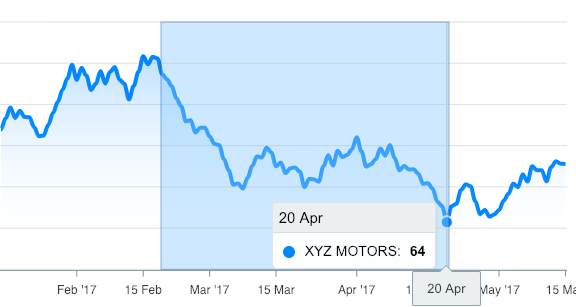
zoomedArea is the area which is drawn when a user drags the mouse from one point to another
fill
color
Background color of the selection zoomed area
opacity
Sets the transparency level of the selection fill
stroke
color
Border color of the selection zoomed area
opacity
Sets the transparency level of the selection border
width
Sets the width selection border